For the log level at runtime, it expanded into something a bit more elaborate and I think well needed so thanks for the reminder (the new OpenTelemetry stuff could use more visibility and adjustability too):
1 Like
If there is a good solution for laying out more complex UML/etc diagrams, that would be worth putting in core… though I guess it depend on how big it is (Mermaid is already pretty huge, for example, and we can do a lot with it for a small number of entities/etc in a diagram, but I’m really not impressed with the auto-layouts I’ve seen). It might be worth adding a UML or more general E-R diagram screen using Mermaid to see how it does, maybe just with a warning that if you put too many entities on it then it will be no bueno.
The nice thing about the interactive artifact browse tool is the layout can stay super simple, and IMO is better that way with other stuff moving around as you click.
Now that I think about it, if we want a library of diagrams that are well laid out we could just use an LLM to do that… maybe something like the current docs in moqui-site but with Mermaid in .md files if that’s good enough, or just use SVGs… auto-layout can generation based on entities can get it everything on the canvas, then AI could lay it out and clean it up… at least I think most recent models should be able to do a passable to very good job with that.
Noted on the service deprecation, a nice to have; we can log warnings at runtime or something, or add this to a linter (there is a linter for XML screens now, now sure if there is one for services but would be nice to add). I’ll think on that more… just flagging it in the XML has some value, but not much more than a comment, so the trick is how to act on these. It calls for something like a lint tool, or a series of lint tools, in Dev AIDE… which would be awful nice.
On the Swagger stuff, a lot of it comes down to tool… what is going to consume the files, whatever we generate. The easiest thing to dump out is a service def XML file… everything else is pretty much just a transformation of that to accommodate external tooling. This is why I’m so jaded on standards in this area, until tooling settles around more common standards… or maybe it has and I’m behind the times.
Finding standards to use for lots of things is still a real pain in the world. Like printed documents… goodness!!! For MR Moqui so far I ended up going with the most universal document standard: HTML & CSS. It is staggering how silly this is. The options for generating a PDF, especially from something that general tooling and most people could handle in some way, are just silly stupid, and I think it’s primarily due to the mostly high-end commercial software that dominates the space and intentionally makes things difficult for open source and DIY in general. So, we end up using or even including an entire browser just to generate a silly PDF. There are alternatives with libraries in Rust, but not many, and regardless of language there just isn’t much out there that is “standard”.
On the other hand, with AI assistance building out our own tools is looking pretty viable… we can “dog food” our own IDE now… which is bonkers. Of course, it’s not just AI assistance that enables that, it’s also good open source projects like CodeMirror, and even Quasar.
I don’t know about all y’all, but if I can run Moqui and not have a dozen apps for everything from Comms to Dev/IDE, and have it in a form that I can muck around with all I want at pretty much every level… well, that makes commercial software a hard sell for me, and even more non-embeddable open source software. I just install Linux, and Moqui, and get on with work (and life).
The vision I have of it for smaller businesses is similar: one system with all your comms and files and ERP/CRM/etc/etc. Employee onboarding is sure a lot simpler when one account gives them email, chat, phone, etc in addition to all the business management/automation apps, and all internal comms can stay on internal infra.
For really large businesses most of the same applies, but there is a bit more explicit architecture needed for things like per-department systems that rollup a ledger into a single system for the corporation.
Now I’m going on about architecture, and could a lot more… the plans/Edge-Node.md stuff I’ve been working on is turning out kind of neat, and along with it from the other direction offline app support for mobile and desktop apps (starting with the Comms features…) in plans/Mobile-Desktop.md. Lots of gRPC going around between Moqui instances… and architecture for the PASS apps (shop, forum, etc) so it can run on a separate edge node along with comms integrations, so the actual system-of-record servers can stay hidden to the world (local server initiates connections with the edge server, so even handles firewalls and dynamic IP… also for the run at home and keep your comms in the cloud model).
So yeah, more and more fun… 
Thinking about UML and ER diagrams and docs more generally… I had the machine do a first pass on an ‘autodoc’ feature that generates markdown documents for the various artifact types, and at the package level it includes per-package diagrams as well as Artifact Browser like diagrams for each artifact (what uses it to the left, what it uses to the right).
One way or another a feature like this, sort of the JavaDoc or GroovyDoc, is useful for man and machine alike. This first pass includes a screen in the Dev AIDE app to view the markdown docs generated on the fly, and there is a CLI option (‘moqui autodoc’) for generating them en-masse.
I check this out and it is great and super helpful indeed!
I was checking out the sources to familiarize myself with the new structure and I was wondering if it would make sense to merge the 3 three component directories under runtime into one:
- runtime/
- component/
- base/
- dev/
- addon/ (or other/)
- component/
The reason I think this is helpful is I do see orgs creating a custom test/ folder where they load custom testing components only on a QA environment, so it would keep all the components under one folder and make the learning curve slightly better. Either way, this is excellent progress and value we’re seeing here.
On the API topic, I was thinking about the core framework just dumping an XML descriptor file as you mentioned earlier and having the ability to add components that translate to whatever tool/standard the developer needs.
1 Like
The direction of mr-moqui seems quite interesting. The offline desktop app is quite important for a POS application. I have also tinkered a lot with the idea of having one central communication system, but didn’t actually finished anything. I really like the idea of having moqui as one integrated system for everything, communication, email, files, ERP… It would make things easier to manage and also more customizable to each specific needs. Btw, is there a demo instance for the mr-moqui, like the one for the old Java framework?
No demo instance yet, still initial build-out going on. I’m still considering what exactly to do with this, how to roll it out with the initial release and all. It started out as a series of experiments, and those went well enough with Opus 5.5 specifically that I decided to go for it and build out this thing for real.
What is coming sooner or later is a big refresh on the web site to cover mr-moqui, with a link to the current web site which will stay as-is for a while for Moqui Java. That’s a big cut-over, and in pre-AI time I’d say we were months away from that… but with these tools I think we’ll have something pretty solid by the end of November (that’s about what I’m considering/scheduling now, loose schedule in my head and frequently adjusting). That includes a build out of most apps plus getting the framework to initial feature-complete in the next 2-3 weeks, leaving a week or two for bulk AI-assisted QA, and time for us people to try out this and that.
WARNING: Before that first 0.1.0 release series, the mr-* repos are NOT data stable; the data model, and even physical storage defaults and such, and still being changed. Right now it’s best to stick with temporary data, not a database that you’ll keep around long term and try to migrate as things change. One big effort that is still coming up, after the initial mr-boss app build-out, is a big data model review. The results of that review may include eliminating many current entities, but not any mantle-udm entities from Moqui Java because another objective is a clean-ish path from Moqui Java to MR Moqui including code and data migration.
On the desktop and mobile apps: we’re using Tauri 3 which is the Chromium based version that is currently in alpha. Using Chromium instead of the WebKit/etc toolkits of Tauri 2 is a big part of the overall mr-moqui architecture, and it is the future of Tauri anyway, so we’re a bit on the bleeding edge there.
Tauri is great for desktop apps, and okay for mobile. From my research so far, we’d have a much easier time with Capacitor + Quasar instead of Tauri for the mobile apps, but this gives us much more code in common between the mobile, desktop, and server builds including significant portions of the Rust code so we can have an offline development toolset similar to the web/hosted one.
What if Moqui could run as a PWA, offline, on any browser? This might be the easiest path to an offline ready POS.
There is some PWA stuff in there now, in just the last few days (a bit before the desktop/mobile stuff); IIRC it includes notifications integration, and I think some call/phone things on some OSes. A first pass is in there anyway, likely to be expanded/refined over time. I don’t know how much hardware control we can do with that, haven’t researched it yet, but it’s worth a look.
For the desktop and mobile apps, part of the consideration (but not much done with it yet) is local hardware control, easy local attached printers (the same IPP/CUPS stuff as on the server) and with a bit more work things like scanners, scales, label printer special handling, cash drawers, etc. The main business cases for it are warehouse and retail, starting with warehouse including a mobile app because we have some stuff from Moqui Java for that already (and because there are various current Moqui Java users with large warehouse operations that I know of, not many with physical retail operations using Moqui… yet).
The desktop and mobile apps benefit from some things that a plain browser can’t so easily, including offline apps with the Rust-based framework tools so you can use entities, services, and XML screens for the ‘native’ apps as well (running in embedded Chromium using Tauri 3 currently). These can also be custom builds with particular settings, transports enabled/disabled (currently defaults to gRPC over HTTP/2 for a streaming binary protocol between Moqui instances, like a desktop or mobile app and a server).
I’m going to try building a Brainfood theme as a component and work on a version of my site that works offline, lets you browse how many hours I worked, etc. It sounds fun to build branded native apps for Brainfood. I have all kinds of printers, scanners and so on locally that I can try to hook in to a POS kind of process. I have a bunch of hardware I should sell on eBay, for instance. Dogfood!
1 Like
It’d be great to get into the hardware side and build stuff out for those, so stuff like that would be helpful… I’m already running into that with a few things already, having to ask the AI to build for something that I can’t test right now… of course, I did quite a bit of dev like that in OFBiz and Moqui without AI assistance (building things I couldn’t really test until months or years later when working with a client to do so).
I guess these days if someone is really dedicated we can probably support hardware that was not meant to be supported, or in ways it wasn’t meant to be supported, like phoning home to Moqui instead of some proprietary system. Maybe with AI assistance even PoS systems won’t be such a PoS. 
It is wild how much AI helps with ‘dog-fooding’, we don’t have to hyper-specialize just to get something useful/usable built… all of a sudden I don’t have so many millions of excuses for not having nice messaging UIs (chat, mail, etc) built as XML Screens and using Moqui Services and Entities so we can embed it as needed in apps without bloating things like mad. At this point a few business nice-to-haves overlap with dev nice-to-haves so maybe we’re not so far from using our own forum, issue tracker, git repo hosting, and so on… all just as integrated and smooth as using GitHub, and even more because we wouldn’t need a separate Discourse forum any more (or google groups for mailing lists). There are big down-sides to taking all that on vs just using GitHub, a project with no legal entity and a $0 budget has certain very odd requirements and free public-ish infrastructure is sure a handy thing for all sorts of reasons from monthly cost to a sort of decentralization that protects from individuals no longer being available.
For the major functional modules, I suggest integrating or building a dedicated workflow engine. Although the current state handling is quite flexible, it still can’t fully replace a proper workflow engine.
The UI looks great now! I just have two small suggestions for improvement:
- Add a small red dot to the labels of required fields.
- Add keyboard shortcuts to make it easier to operate without a mouse.
While I like the idea of more workflow management, the biggest question around it is generally what is needed to tie together and extend pieces we already have, mainly in the WorkEffort* entities which model workflow templates, workflow instances, task assignments within workflows for humans/agents/algos, and so on. There is no separate execution engine, it’s just SECAs and statuses and such, but in a way an “execution engine” at this point is just some higher level services and a UI (just ). The plans for the IronStone Sales app in the mr-boss component is starting to move in this direction, and in the new IronStone BOSS apps there are a number of screens in different apps that do different workflow-like things already.
In other words, I’m not sure we’ll ever have a separate workflow engine like what that means in the enterprise Java/etc world, but we will have improvements to the existing workflow management tools. One early start on this is the ECA rules stuff in Dev AIDE, and I think we’ll end up getting into a lot more of that… a BPML-like workflow editor in Dev AIDE (and maybe elsewhere) might be really useful… I’ll get into that sooner or later, unless someone beats me to it.
On the UI improvements, I’ll keep those in mind… the TUI is currently the most keyboard-oriented, but as a warning the current key mapping is modeled after old screen screen apps so watch out for the left and right arrow keys (it was a different era). I’m planning to add some more modern key mappings, more friendly for modern Linux TUI common practices than 1970s IBM.
The main thing with the UI right now is it is still early on, and AI-generated, and I still have AI testing/review passes to do where I tell a decent model to just go for it and fix/improve stuff, then have another model review it all before pushing. This means lots of smaller UI changes going in still, and lots of fixes. I’ve made a few specific changes here and there, and so has Ean, but for the most part I’m still holding off on that while I’m still planning to let AI agents run free on it in big passes (like one running right now on the IronStone Projects app, just finished a pass on Commons and Comms).
Some personal thoughts on workflow engines:
- “Workflow” is quite a broad concept, and different scenarios call for different approaches.
- In Moqui, the standard status mechanism handles processes with fixed roles and steps quite well.
- The Workeffort module manages workflows with fixed steps and specific assignees by configuring task participant roles.
- SECA offers more flexibility, but it can be cumbersome to use and makes handling process versioning difficult.
Engines like Flowable and Camunda take a broader system-level view, covering not just human tasks but also system processes and cross-system integration.
I think we need a relatively flexible process engine tailored for internal enterprise management, while fully leveraging Moqui’s existing capabilities.
The engine should manage two aspects: data and functional compositions for data processing.
- Data maintenance is handled via Entities.
- Functional compositions consist of two parts: composable functions (handled by Services) and their relationships (currently a gap, and likely the core focus of a workflow engine).
- The UI during execution is handled via Screens.
This approach maximizes the use of existing Moqui features while staying compatible with current Moqui process handling.
For defining these relationships, we can simply refer to BPMN standards.
Key challenges to address within Moqui include:
- Process definition
- Version control
- How processes invoke Services
- Mapping process nodes to Screens
- Handling process data vs. entity data
Just throwing these ideas out there—would love to hear your thoughts or any better approaches!
Yes, those are all the tooling things if we wanted to make something like a BPMN workflow engine, but what is the business requirement that is for? That is sort of the conceptual direction I’d rather lean away from rather than towards, mainly because they tend to be a poor fit for lots of different things but not a great fit for much.
For example, a Sales Funnel/Process seems to be a fairly common application, and would include a combination of automated/service steps as well as “human” steps… which are really just automated steps to create and assign a task or something. Technically in workflow engines all steps are automated, just the human and external system ones involve automations that interface with humans and external systems.
@aabiabdallah put together an interesting Moqui-based workflow variant with a visual editor, IIRC meant to be embedded in more task-specific apps.
In a way in Moqui we need something like a “Workflow” app that has all the things: Status Flows, SECA/EECA/emECA/gitECA rules and the services related to them, high-level services that are “composition” services, WorkEfforts of various types with varying UIs for them, and… there is probably more.
One thing I’m trying to do is corral a lot of these resources, bring them together and make them more visible, so it is easier to understand how they are, can be, and/or are meant to be used together.
One fun new tool that isn’t workflow but you can do some really funky runtime stuff with: there is now a Configuration viewer and editor in the System app where you can see the whole Moqui XML Conf tree, where things came from, which ones can be updated live, and edit the sources with live updating where supported too.
1 Like
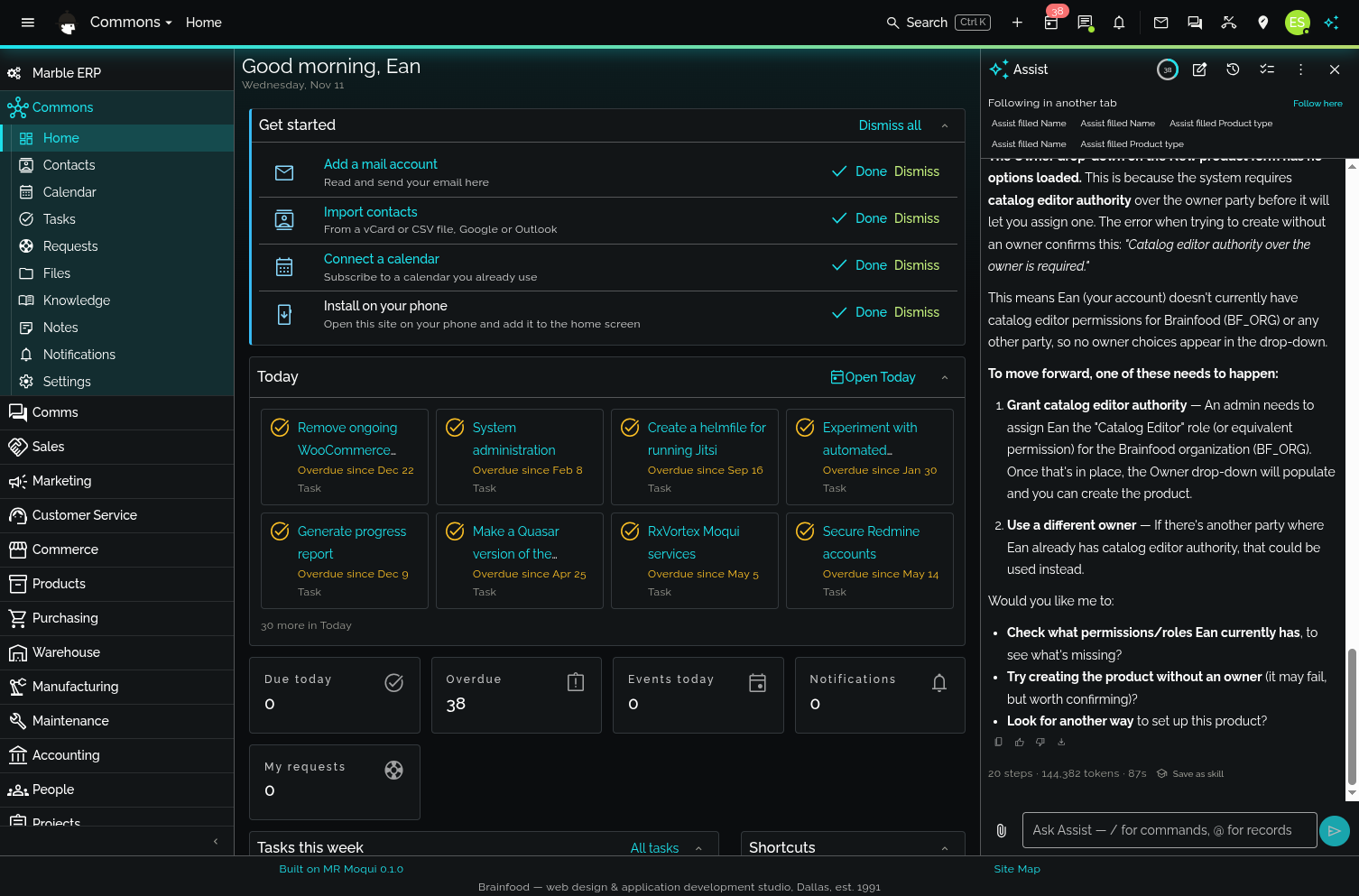
I’ve plugged some Brainfood business data into Mr-Moqui to flesh things out and, wow, it feels like a whole new universe. The chat window is being driven by my local VLLM Qwen 3.8 27B. One critical thing I had to do is force the thinking level down. Do we have a plan for managing this kind of model knowledge? Like, what thinking level makes sense for what models in which roles on the system?
1 Like
Wow… yeah, having all the new UI niceties, a bunch of data, and an AI assistant… it really is starting to get sci-fi-like.
It does remind me of how big/complex all of this is getting… well, I guess Moqui Java was already complex enough, it’s just different seeing so many options surfaced, and so much info about the system visible. There are new things in MR Moqui with their own config/settings complexity, but as I work on the general configuration and settings stuff… I’m wondering if we’re already to the point that AI assistance is needed to configure the darn thing in a reasonable amount of time… and along with that how much AI assistance can help us improve the UI so that a human can do it all when in a pinch, and either way so a human can see everything that’s going on somewhere or other.
Anyway, yeah… and still coming across new ideas that we can cheaply incorporate. For example, I’ve been getting terminal envy seeing all the fun stuff in terminal managers and muxers (well, not really, I don’t seem to experience that emotion), and we already have a Terminal that just needs a few enhancements, that I want to do anyway like floating window-like dialogs, so off we go… it could use some refinement, but now we have a mutli-terminal tool, and enhancements for those terminals tying into the host OS… so now you can setup a Moqui Dev instance and use it locally in a browser or the desktop app for all terminal work… and with it setup that way you have remote and/or internet control over your dev environment… and if you really want to push it, now you can setup a Moqui Edge Node that your local dev environment connects to from inside your firewall and on a dynamic IP if needed, and then you can open up the Moqui Mobile app on your phone and have web+terminal control of your dev envrionment.
While the current Dev AIDE and other tools in Moqui are a cool use case for this, it opens up all sorts of use cases for apps built within Moqui, or using Moqui to build apps and do stuff completely separate from Moqui.
Having toolsets like this available, and AI assistance to do fancy things cheaply with them, is pretty wild… I keep wondering when I’ll run out of big cool ideas to throw in there cheaply based on tooling we already have… and I don’t know, but it already feels like I can “eat” most of the software I care about using day-to-day and just use this one “little” package… still under 100MB for the built archive (with postgres, without chromium).
And… Anthropic handed out some free weekly usage resets this week, so I’m now working on pushing through the big backlog… should be able to get an initial build out of all the BOSS and PASS apps this week… and trying Fable 5.2 medium on some of the more sensitive lower-level dev work which is helpful, but not night-and-day compared to Opus 5.5 medium, FWIW.
1 Like
I have a new version of the Workflow engine that is more closely aligned with OOTB entites (such as WorkEffort, ServiceRegister, etc). It also uses XML actions for service implementations instead of Java so porting it should not require much effort.
The only challenge I see is the builder UI because that uses a properietry library. It should be doable with AI support. I’ll start working on that as soon as the stable build arrives.
2 Likes
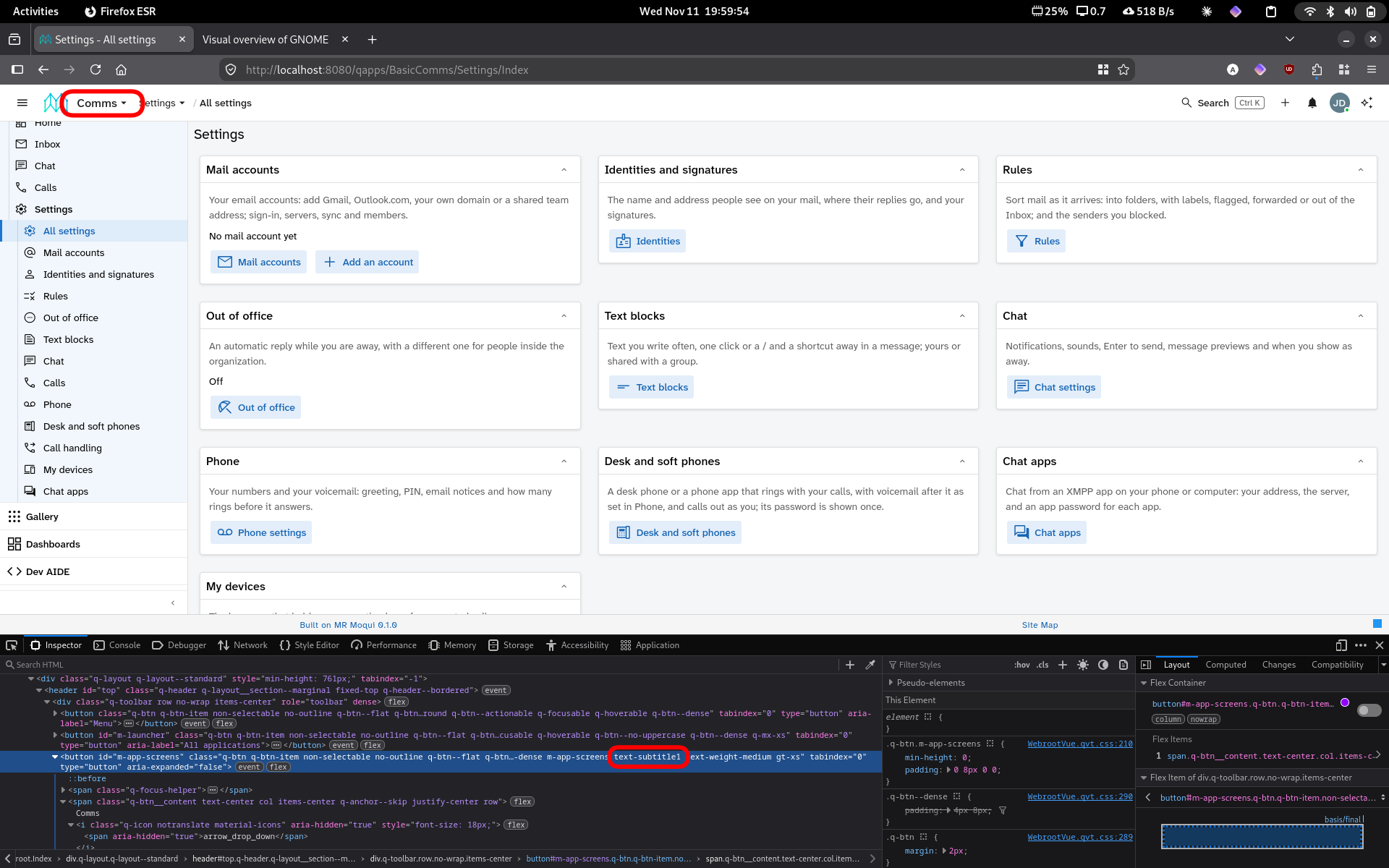
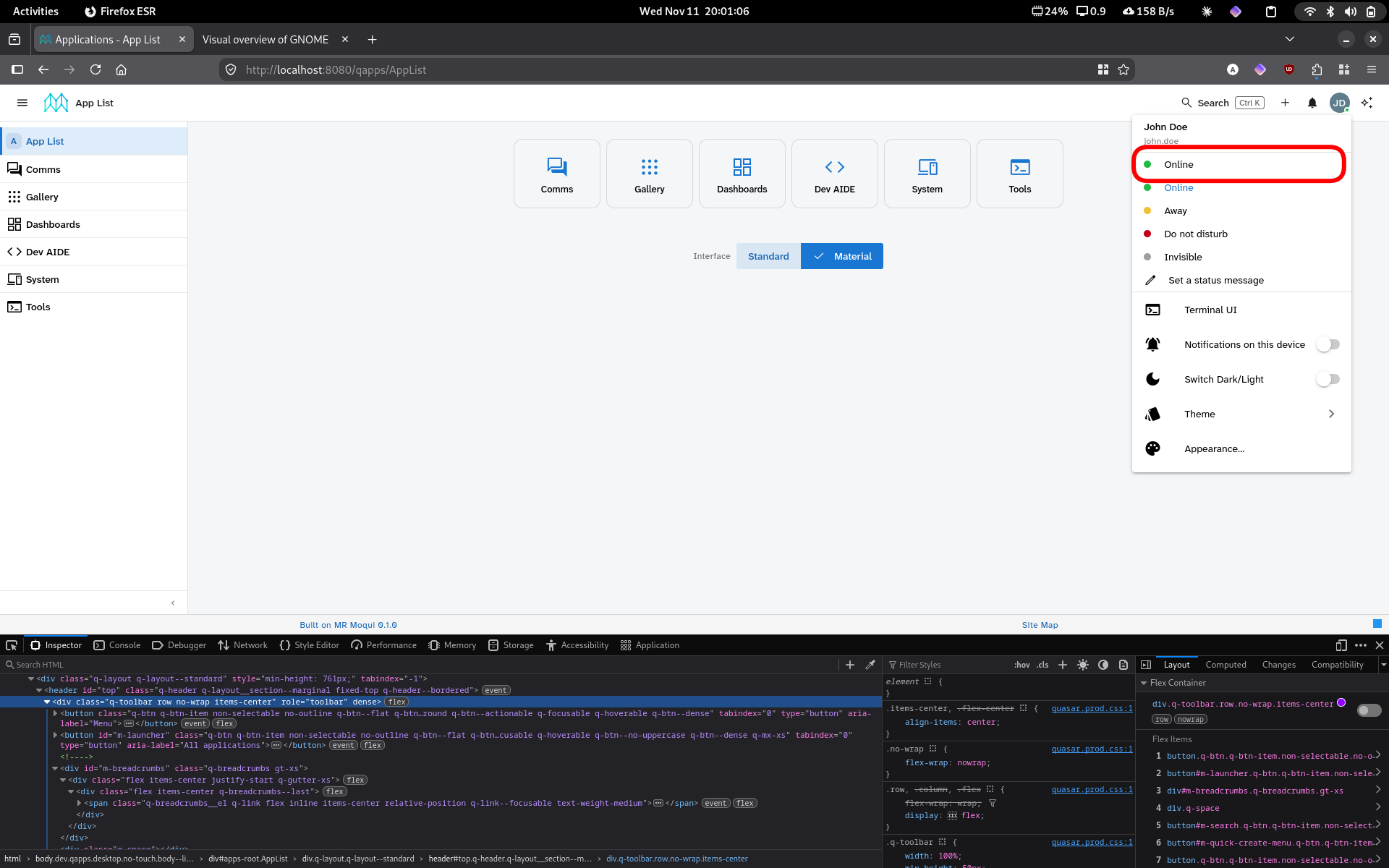
I propose a couple of minor UI tweaks:
- Remove the
test-subtitle1class from navigation breadcrumbs so it’s consistent with App List which doesn’t have it. - Removing the user online status and replacing it with a checkmark to the right of the selected status. It is somewhat confusing and seems clickable at first glance.
1 Like
Regarding the process designer, have you considered using Camunda’s open-source bpmn-js?bpmn-io/bpmn-js: A BPMN 2.0 rendering toolkit and web modeler.
1 Like
This is a bit of a warning for anyone with current checkouts or mr-moqui, involves addon components moving to a new directory, and is some pain I figure is better sooner than later.
I didn’t like the growing number of component-containing directories under runtime/, and saw the comment from @aabiabdallah about the idea of component/base/ and component/dev/ sorts of directories, so going with a small variation on that with a new ‘components’ directory that replaces the existing base-component, dev-component, component, ecomponent, etc directories with configurable subdirectories under it, initially: base, dev, test, and addon.
With this structure all existing clones of mr-moqui will need to move their addon components from runtime/component/ to runtime/components/addon.
2 Likes